开口说,剩下的交给 AI。 Say the word. AI does the rest.

给 Claude、Codex、ChatGPT 下指令,写代码、写文档、回消息:说出来比打字快三倍,而且声音只留在你的 Mac 上。 Prompt your coding agent, draft a doc, answer a message: speaking is three times faster than typing, and your voice never leaves your Mac.

macOS 15 或更新 · Apple 芯片(M1 及以上) · 开源免费 macOS 15 or later · Apple silicon (M1 or newer) · Free and open source

菜单栏弹窗 Menu bar window
录音时的提示条 Recording bar

说话时,屏幕底部有一条跟着声音跳动的波形。While you talk, a live waveform sits at the bottom of the screen.

完成提示 Done

松开键,文字就粘贴到你刚才所在的输入框里。Let go, and the text is pasted where you were typing.

为每天说很多话的人做的Made for people who talk a lot

Cadabra 住在菜单栏里。在任何 App 里按住一个键说话,松开,文字就出现在光标处,中英混着说也行。Cadabra lives in your menu bar. In any app, hold a key, talk, let go, and the text appears at your cursor, Chinese and English mixed if you like.

快Fast

几秒钟的话,识别只要 约 50 毫秒。松开键,字几乎同时出现。A few seconds of speech is recognized in about 50 ms. The text is there almost as you let go.

中英混说Chinese and English, mixed

“这个 PR 先别 merge” 照样听得懂。也支持粤语、日语和韩语,会自己判断你在说哪种。“这个 PR 先别 merge” works as said. Cantonese, Japanese and Korean too, detected automatically.

越用越懂你Learns your words

在原处改掉听错的词,它就记住。只学真的听错了的(读音相近),不会把你改写的内容当成错误。Fix a misheard word where it landed and Cadabra remembers. It only learns real mishearings (they sound alike), never your rewording.

本机大模型纠错(可选)On-device correction (optional)

打开后,用本机的 Qwen 模型按上下文改正同音字和专有名词,参考你的常用词。同样不联网。Turn it on and a local Qwen model fixes sound-alikes and names from context, using your vocabulary. Still offline.

不乱粘贴Never pastes in the wrong place

只粘贴到你说话时所在的输入框。中途切了窗口、或光标在密码框里,就只复制到剪贴板。你原来的剪贴板会放回去。Text goes only into the field you were in. Switched windows, or a password field? It's copied instead. Your own clipboard is put back.

十二套主题Twelve themes

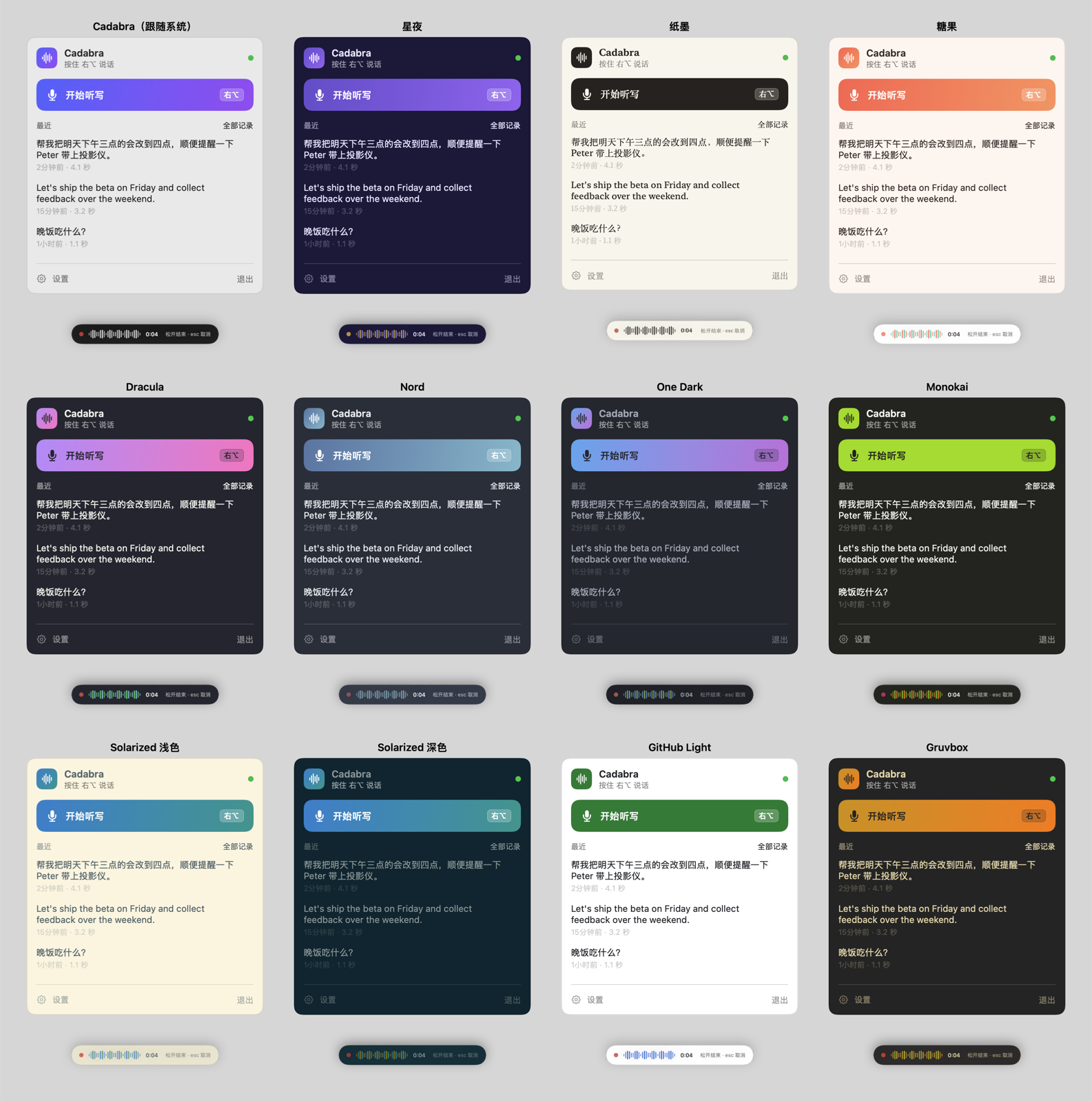
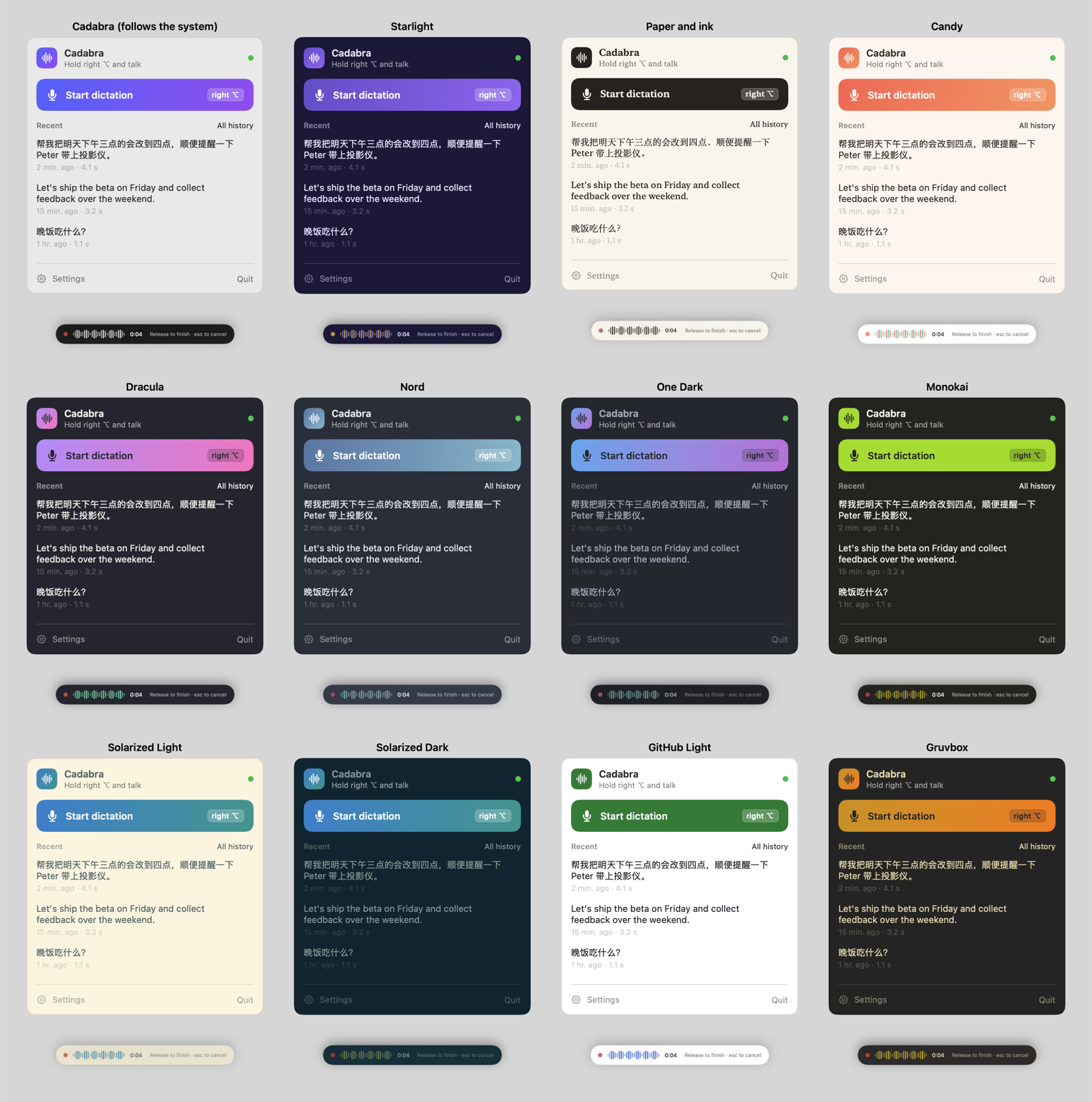
除了默认的样式,还有星夜、纸墨、糖果,以及 Dracula、Nord、Solarized 这些写代码时熟悉的配色。Besides the default: Starlight, Paper and Candy, plus the editor palettes you know, like Dracula, Nord and Solarized.

你说的话,只留在你的 Mac 上What you say stays on your Mac

识别模型 SenseVoice-Small 就打包在 App 里。没有账号,没有云端,不上传任何东西。The SenseVoice-Small speech model ships inside the app. No account, no cloud, nothing uploaded.

  • 识别完全离线。Recognition is fully offline. 断网照样能用,录音只在内存里,识别完就丢掉。It works with networking off; audio stays in memory and is dropped after recognition.
  • 只有两种联网,都要你点了才会发生。Only two kinds of network access, both on your click. 下载可选的纠错模型(来自 Hugging Face,校验 SHA-256),以及“检查更新”(问一下 GitHub 最新版本号,不会自己下载安装)。Downloading the optional correction model (from Hugging Face, SHA-256 checked), and Check for Updates (asks GitHub for the latest version; never downloads or installs by itself).
  • 你的数据只有你能读。Your data is yours alone. 历史记录和学到的词存在本机,文件只有你的账户可读,随时可以清空。History and learned words are stored locally, readable only by your account, and can be cleared any time.
  • 开源,可以自己查。Open source, so you can check. 代码都在 GitHub 上。All the code is on GitHub.
# 自己看看 Cadabra 有没有网络连接# See for yourself: Cadabra's network connections
lsof -i -a -p $(pgrep -x Cadabra)

# 什么都不输出,就是没有连接# No output means no connections

换个心情Make it yours

设置 › 通用 › 主题,选了马上生效,菜单、录音提示条和设置窗口一起换。Settings › General › Theme changes the menu, the recording bar and the windows at once.

Cadabra星夜Starlight纸墨Paper and ink糖果Candy DraculaNordOne DarkMonokaiSolarized LightSolarized DarkGitHub LightGruvbox
十二套主题 Twelve themes

一分钟装好Set up in a minute

需要 macOS 15 或更新、Apple 芯片的 Mac。Needs macOS 15 or later on an Apple silicon Mac.

下载Download

从 Releases 下载 Cadabra-x.y.z.dmg,把 Cadabra 拖进「应用程序」。Get Cadabra-x.y.z.dmg from Releases and drag Cadabra into Applications.

第一次打开First launch

如果 macOS 提示“无法验证”,到 系统设置 › 隐私与安全性,点 Cadabra 旁边的「仍要打开」。只需要一次。If macOS says it can't verify the app, go to System Settings › Privacy & Security and click Open Anyway next to Cadabra. Only once.

授权两项Allow two things

麦克风(听你说话)和辅助功能(监听快捷键、把字粘贴到光标处)。欢迎窗口会一步步带你完成。Microphone (to hear you) and Accessibility (for the shortcut and pasting at your cursor). The welcome window walks you through it.

按住右 Option,说话Hold right Option, talk

松开就输入。或者轻按一下开始,说完再按一下结束。快捷键可以换。Let go to type it. Or tap once to start and again to finish. The key can be changed.

常见问题Questions

要钱吗?Does it cost anything?

不要。Cadabra 免费开源。觉得好用的话,欢迎在 GitHub 上赞助或请我喝杯咖啡。No. Cadabra is free and open source. If it helps you, sponsoring on GitHub or a coffee is always appreciated.

Intel 芯片的 Mac 能用吗?Does it run on Intel Macs?

不能,需要 Apple 芯片(M1 或更新)。No, it needs Apple silicon (M1 or newer).

戴着 AirPods 能用吗?Can I use it with AirPods on?

能。默认会用电脑或摄像头的麦克风录音,耳机继续放音乐。用耳机的麦克风会让它切到通话模式,开始慢好几秒、声音也会变闷;要用的话可以在设置里指定。Yes. By default it records with the Mac's or camera's microphone and leaves your AirPods playing; using their microphone switches them to call mode, which delays the start and muffles the sound. You can still pick it in Settings.

纠错模型一定要下载吗?Do I need the correction model?

不用。不下载也能正常听写。纠错模型比较大(4B 版约 2.7 GB,35B 版约 22 GB),适合常说专有名词的人;不用时它会自己从内存里卸载。No; dictation works without it. The model is large (about 2.7 GB for 4B, 22 GB for 35B) and helps most if you say a lot of names and jargon. It unloads itself from memory when idle.

以前叫 MyWisper?Wasn't this called MyWisper?

对,1.2 起改名叫 Cadabra。装上新版后,设置、历史记录、学到的词和模型都会自动搬过来。Yes, until 1.2. Install Cadabra and your settings, history, learned words and models move over by themselves.

按住一个键,开始说吧。Hold a key and start talking.

下载 CadabraDownload Cadabra