Adding Meshes, BVHs, and Photon Mapping to My Browser Ray Tracer
May 5, 2026
The previous ray tracer rewrite got me to Monte Carlo path tracing and a fast WebGPU backend. That was already a huge jump from the old recursive JavaScript renderer, but it still only handled a toy sphere scene.
So I kept going.
This round added:
- triangle mesh support
- Stanford bunny scenes
- BVH acceleration
- continuous progressive rendering
- CPU-side photon mapping
- world-space caustic estimation for the WebGPU path
It also added a lot of bugs. Some of them were interesting.
Continuous Rendering Instead of One-Shot Rendering
The original browser flow was still basically "click render, wait, get an image." That is fine for a traditional ray tracer, but it feels wrong once the renderer is progressive.
Both backends now run continuously:
- WebGPU starts path tracing automatically
- CPU workers keep accumulating frames indefinitely
- switching scene, backend, BVH, or tracer mode restarts immediately
- the UI shows a live FPS counter
That makes the renderer feel much more like a modern progressive preview than a batch job.
Triangle Meshes and the Stanford Bunny
The next obvious missing feature was mesh geometry.
I added a TriangleMesh path to the CPU renderer, then extended the WebGPU scene packing and shader intersection code to carry triangles too. The Stanford bunny became the first real scene stress test, and it immediately exposed a bunch of things that spheres hide:
- flat-shaded normals look awful
- brute-force triangle traversal is too slow
- material bugs become much easier to spot on curved silhouettes
So the bunny scene ended up driving most of the later renderer work.
Smooth Normals and a BVH
Per-face normals made the bunny look faceted, so I switched to averaged vertex normals and barycentric interpolation at hit points. That alone made the mesh read like an actual surface instead of a pile of triangles.
Performance was the bigger problem.
Testing every triangle against every ray is fine for a demo with a few primitives. It is not fine once three bunnies show up in the scene and the renderer starts tracing many bounces per pixel. I added a BVH on the CPU side and a packed flat BVH for WebGPU so rays could reject most triangles cheaply.
There is also a UI toggle to turn the BVH off, which is useful both for debugging and for proving that it is actually doing work.
Materials: Glass, Matte, and "Jade"
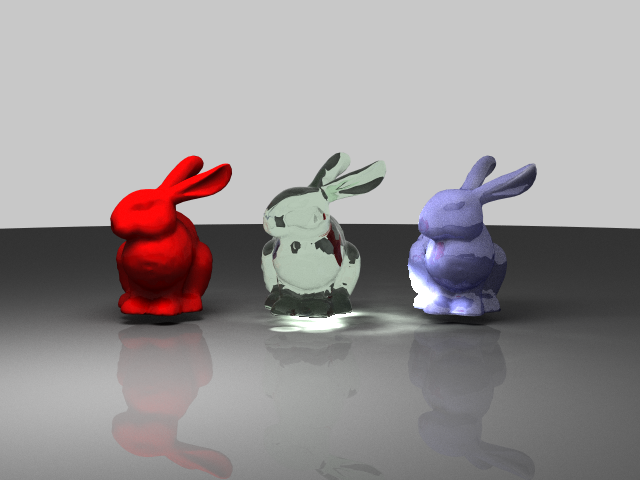
Once the bunny scene existed, I used three copies of the mesh with different materials:
- a red matte bunny
- a green glass bunny
- a blue jade-like bunny
The red and green cases were straightforward. The blue one was not.
I first cheated by overloading the old refractive material path, which made the bunny look more like glossy plastic or glass than stone. That was the wrong model. I split the effect into a separate subsurface-style path and kept refraction for actual dielectric materials.
It is still a lightweight approximation rather than a full production BSSRDF, but it is much closer to the look I wanted.
CPU Photon Mapping
The big new lighting feature was photon mapping on the CPU backend.
The normal CPU path tracer now builds a photon map by:
- sampling the area light
- tracing photons through the scene
- storing caustic and global photon hits separately
- gathering caustic energy at visible diffuse surfaces
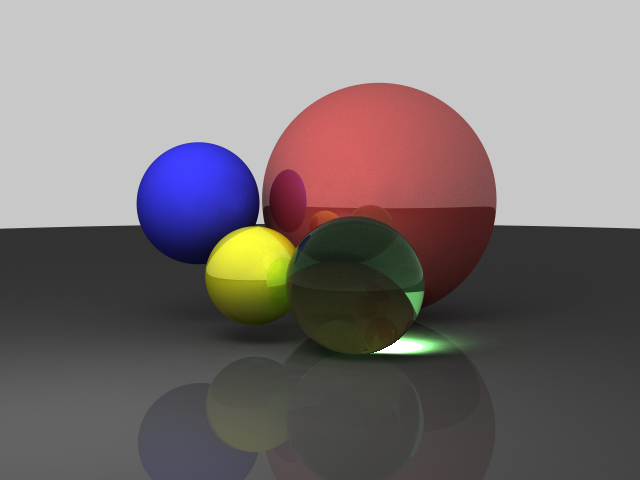
The reason for adding photon mapping was simple: caustics are painful for plain camera-only path tracing. Refractive paths exist, but they converge slowly and the focused light pattern under a glass object is hard to discover reliably.
Photon mapping is biased, but it is a very practical way to make those light paths visible.
WebGPU Caustics: From Screen Space to World Space
I also tried a screen-space caustic pass on the WebGPU backend. It worked well enough to prove the idea, but it had all the expected problems:
- view dependence
- projection bugs
- receiver matching issues
- "sticker-like" additive composition if the math was not careful
So I replaced it with a world-space caustic estimate built from the same photon-map logic the CPU backend uses. The current WebGPU path still composites that estimate into the GPU render rather than doing the full photon gather directly inside WGSL, but the transport model is much better grounded than the earlier screen-space hack.
That said, this part is still the messiest piece of the renderer and the place where CPU/WebGPU parity is hardest to maintain.
The Bugs Were the Real Project
The funny part is that the feature list sounds clean in hindsight, but the real work was mostly debugging:
- half-float accumulation made long-running WebGPU renders darken after enough frames
- backend switching could race and break the live renderer
- CPU and GPU material layouts drifted out of sync
- subsurface exits could use the wrong surface orientation
- caustic maps could show up upside down or in the wrong place
- refractive tinting could make low-IOR glass look far too dark
- photon contributions could blow out into giant white dots if the value scale was wrong
Most of the recent progress was not "invent a renderer from scratch." It was "make two partially different renderers stop disagreeing with each other."
Where It Stands Now
The ray tracer is in a much more interesting place than it was a couple of weeks ago.
It now has:
- CPU and WebGPU backends
- continuous progressive rendering
- sphere and triangle-mesh scenes
- Stanford bunny variants
- BVH acceleration
- diffuse, reflective, refractive, and subsurface-style materials
- CPU photon mapping
- world-space caustic estimation feeding the WebGPU path
It is still very much an educational renderer, not a production one. The caustic path in particular is still the least settled part of the system, and matching CPU and WebGPU perfectly is harder than it sounds once photon maps, subsurface scattering, and progressive accumulation all get involved.
But that is also what makes it fun. The project started years ago as a simple way to learn ray-object intersections and shading. Now it is a browser renderer with mesh support, BVHs, photon mapping, and just enough physically-based lighting to keep generating new bugs.
That feels like progress.
Try the ray tracer live if you want to poke at the scenes, swap backends, or watch the caustics converge.