Hold a Key and Talk to Jarvis
Nov 19, 2026
Yesterday's post ended with Cadabra 1.2, my Mac dictation app learning from the words I fix. That same night, three more releases followed. The last one connects it to Jarvis, the voice assistant I built around an Android phone and a Hermes agent in my home lab. Now I hold a key on the Mac, say what I want, and Jarvis answers in a small window next to my text.
First, closer to my words (1.3)
Before the agent came three things that make plain dictation better.
- Leaning toward my words. Cadabra used to take the most likely character at each step of the speech model's output. It now runs the model itself and keeps several candidates. When a stretch of sound could go either way, the one that spells a word from my vocabulary, or an English word I've corrected to before, gets a bonus. Clear speech is left alone. On 294 of my recordings, character errors fell from 4.9% to 3.8%: 21 recordings got better and none got worse, at about 60 ms each.
- Reading the text around the cursor. When I stop talking, Cadabra reads a few hundred characters around the cursor. Uncommon words there, like names and variable names, count as my words for that one dictation, and the correction model sees them too. With "Jonathan" in the text, 乔纳森 (Jonathan, written in Chinese) becomes Jonathan; without it, it stays as heard. Nothing is stored, and password fields are skipped.
- Editing by voice. I select some text, hold the rewrite key (mine is the right ⌘) and say what to do with it: "translate it into English", "make it three bullet points". The local language model rewrites the selection in about a third of a second. My first test asked for something extremely wordy, and it obliged by repeating the same clause over and over.
1.3.1 added typing as I talk: the words go into the text field while I speak, and the last few change as recognition catches up. Testing it turned up a sentence that appeared twice. The live typing wasn't to blame. The correction model had copied my previous sentence, which it could see before the cursor, into the new one. Corrections may now change words but not add them. The recording bar also moved from the bottom of the screen to just above the line I'm typing on. Cadabra can also be installed with Homebrew now.
A third key
Jarvis already had a text interface: send it a sentence, get a reply, and send the conversation's ID back to continue it. On the phone, Jarvis does its own speech recognition. On the Mac, Cadabra does that part, faster and with my words favored, and only the text goes to Jarvis.
The first version was built into Cadabra: hold the agent key, talk, let go, and a panel shows the words. Jarvis's agent can run commands and control things at home, so nothing was sent until I pressed Return. The panel then failed to show up at all, twice. Cadabra runs in the background, so the panel lost focus the moment it opened, and I had told it to close when it lost focus. Once that was fixed, it came out 0×0. Then I asked for the panel to open as soon as the key goes down, with the words appearing as I talk.
Who owns what
Jarvis has a look of its own: a flame of translucent ribbons that follows the voice and changes color with what Jarvis is doing. I wanted that on the Mac too, but not as part of Cadabra, which is a public project and shouldn't know Jarvis exists. So it became a plugin. Then the design kept moving, one question at a time:
- The look was a plugin, but how to reach Jarvis was still written in Cadabra. I asked for a single plugin that holds both the interface and the look.
- The panel itself, with its confirmation and the reply, was still Cadabra's. That should be the plugin's too.
- The access token was kept by Cadabra in the Keychain. That too.
- Claude suggested Cadabra send the plugin's requests for it, since a page loaded from disk can't normally call a server that doesn't allow it. The plugin should do that too.
Each step moved something out of Cadabra, and it ended up with a single job: listening. While the agent key is down, it records, recognizes the words, and tells the plugin's page what it hears: that listening started, the words so far about once a second, the final words, the microphone level, or that it was cancelled. It opens a borderless window near the text for the page, and gives it four small tools: close, resize, copy, and a little storage of its own. Everything else is the plugin's: what the window shows, whether I confirm, calling the agent, the reply, reading it aloud, its look and its token.
That makes a plugin just a folder with a short plugin.json and a web page. It also limits what a plugin can reach:
- The page can read only files in its own folder.
- It can reach only the hosts listed in
plugin.json. Every other request is blocked, fonts and scripts from the web included. - It is told only what's listed above: not which app I was in, not the text there, not my dictation history.
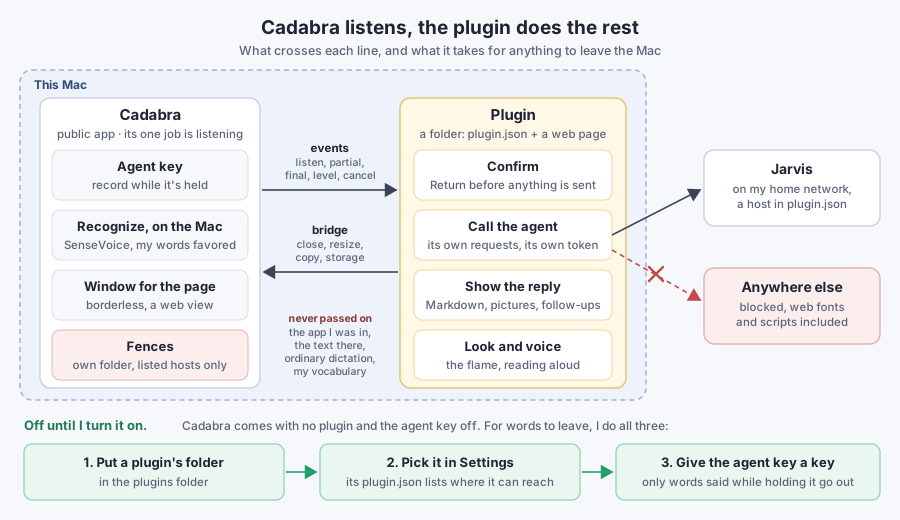
There's a trade-off. A plugin exists to send my words somewhere else, and it now draws the panel too, so it sees my words and the reply. It has to be trusted as much as the agent behind it, which is why Cadabra never runs one I haven't chosen (more on that below). Mine is my own code, and it stays in my private home-lab repository with its address and token. The public repository has an example instead: a tiny agent that repeats what it hears, and a plugin with a glowing orb, to try the key or start your own.
The Jarvis plugin
The plugin redraws the Jarvis app's flame, ported line by line from the Android code into a canvas. It's teal while I talk and follows the microphone. While Jarvis works, it streams what it's doing, and the flame follows: purple while it thinks, cyan when it looks something up, amber when it calculates, green when it writes code. Reading the reply aloud in Jarvis's voice turns it orange. Each change fades over 0.8 seconds, like on the phone.
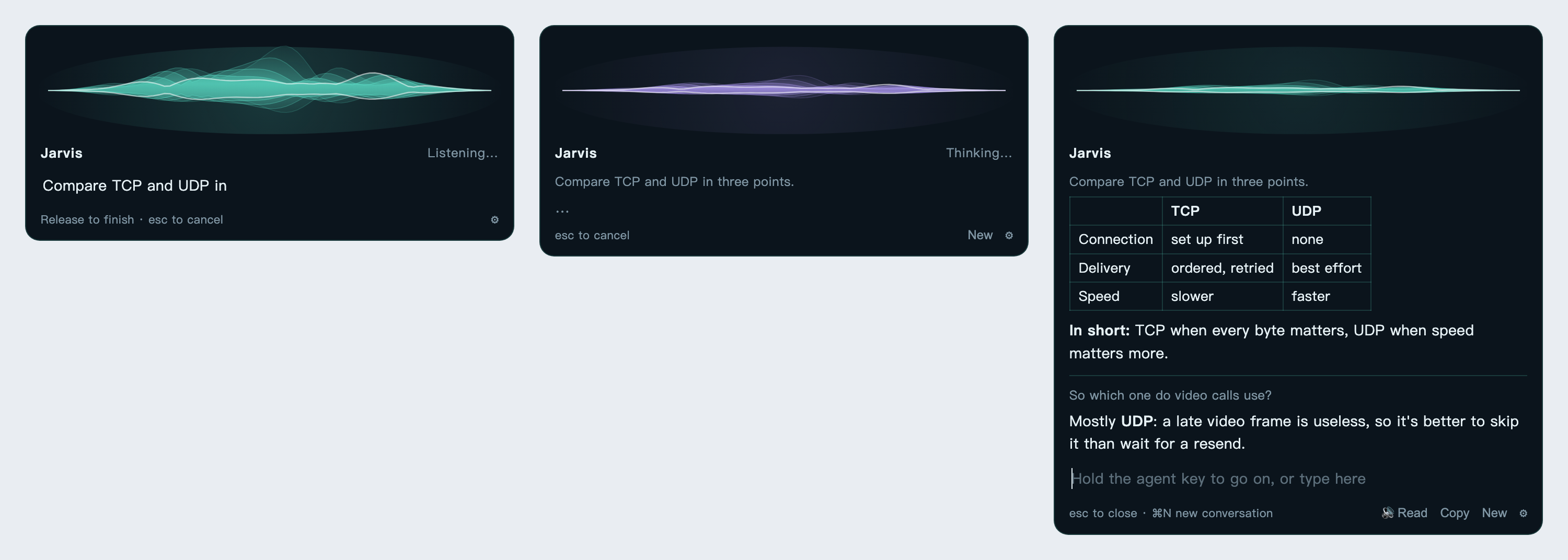
Listening, thinking, and a conversation two questions long. A mock-up: the plugin's page in a browser, with stand-ins for Cadabra and Jarvis.
It's the same Jarvis as on the phone, with the same memory. Its agent has a terminal, files, the web and the home controls, so I can ask whether last night's backup finished, what a server is running, or something I'd otherwise look up. Answers take five to thirty seconds, since Jarvis shares its model with my main Hermes agent.
A window, not a phone
Jarvis was made for a phone: its replies are short sentences meant to be heard. A window can show more, so over the next hour the plugin grew, still without a change to Cadabra:
- Markdown. Replies are rendered with tables, lists and code blocks. The page can't load anything from the web, so the Markdown renderer and an HTML sanitizer live in its folder, and every reply is cleaned before it's shown, since a model wrote it. Reading aloud skips the formatting and the code. Jarvis itself had to change for this one, since it was told to avoid Markdown. Now the plugin marks its requests as coming from Cadabra, and only those may use formatting. Asked to compare TCP and UDP, Jarvis answered the window with a table and the phone with its usual paragraph, both in about six seconds.
- Pictures. Jarvis can now draw, with the image model on another of my machines at home: about 9 seconds for a 1024×1024 picture, 20 for the whole request. The picture stays on Jarvis, behind the same token, and the plugin fetches it and scales it to fit. Again, only the Cadabra window gets this.
- Conversations. Every question and answer stays in the window, newest at the bottom, and Jarvis keeps the context. I follow up by holding the key again, or by typing under the conversation. esc only hides the window. New, or ⌘N, starts over, and so does half an hour without a question.
I also tried sending the words as soon as I let go, without Return. It lasted about ten minutes. These words go to an agent that can run commands, and I'd rather read them first. Confirming with Return is the default again, and sending on release is a switch, off. Both changes were to the plugin's page only.
What leaves the Mac now
Dictation still sends nothing anywhere: no audio, no text, no learned words. The agent key is the one way out, and it's closed until I open it. Cadabra comes with no plugin installed and the agent key off. For anything to leave, I have to do three things myself: put a plugin's folder in the plugins folder, pick it in Settings, and give the agent key a key. Even then, only what I say while holding that key goes out, and only to the hosts the plugin lists in its plugin.json, which I can read before installing it. Ordinary dictation never passes through a plugin. Mine sends my words to Jarvis on my home network, and they never leave the house.
Cadabra 1.4.0 is on GitHub, along with how to write a plugin and the example.
The lesson from this round: each time I asked where a piece belonged, the answer was the plugin. Cadabra got smaller and more general at once. It listens, and the plugin decides what the listening is for.