Abracadabra, It Learns My Words
Nov 18, 2026
A week ago, version 1.1 of my dictation app learned to fix what it mishears, with a language model that reads the text in context. What I wanted next: the longer I use it, the better it should get, at my accent, my names, and the words I mix in from English. Version 1.2 is a step toward that. It also has a new name, Cadabra.
Learning from my fixes
When a word comes out wrong, I fix it in the text box before sending. That fix is the best signal there is, so Cadabra now watches for it. Right after it pastes, it follows the text field for up to two minutes through macOS's Accessibility interface, the same permission it already needs for pasting. Password fields are skipped. When I swap a word, it records the pair: what it heard, and what I meant.
A fix I've made once goes to the correction model as a hint. A fix I've made twice is applied directly, before the model even runs. Fixing an entry in History counts right away. The first fix it learned came from a 3D printing session: 职称 (job title) became 支撑 (supports), which sound almost the same in Mandarin.
Learning the right things
After a few days, a review of what it had learned was humbling. Of 88 learned fixes, about half weren't mishearings at all. They were me changing my mind: engine to model, 十二 to 8. One of them, evaluate → evaluator, had been confirmed twice and was about to rewrite every evaluate I said.
So 1.2 learns only changes that sound like what was heard: the two sides are compared by pinyin, plus a list of easily confused English letters. A fix that would replace an ordinary English word stays a hint and is never applied on its own.
The correction model gets the same rule. Given my learned words as hints, it once changed a word it heard correctly, "ender" in a sentence about my Ender printer, into "push", another word I'd taught it. Now any change that drops one of my words, or swaps in something that doesn't sound like the original, is undone. The same check undoes English it translated into Chinese (dictation, misheard as "detention", had become 待定, "to be decided").
Teaching the model my voice
Fixing text after the fact only goes so far. What I really wanted was a speech model that slowly adapts to how I talk. So Cadabra can now keep each recording together with its final text (off by default), labeled by how sure that text is: I fixed it, I sent it unchanged, or the correction model changed it and nobody checked.
Claude tried two ways to use that memory, both without changing the model's weights:
- Frame by frame (kNN-CTC): every 60 ms of my voice is matched against my past recordings. It made things worse, 11.1% character errors went up to 12–17%. It faithfully learned the correction model's wrong guesses, and it replaced pieces of words, so "christian" came out as "Christianristian".
- Whole words: each word I corrected is kept with the stretch of audio where I said it, and new recordings are searched for close matches. On 64 recordings I checked by hand, the error rate fell from 3.4% to 1.7%, with nothing made worse. From other recordings it turned "kiowway", "killkiowway" and "killlow away" all into Kilauea.
On a week of ordinary use, though, the gain almost vanished: 4.8% to 4.7% over 140 recordings. Most words I'd corrected only once, and a word has to show up at least twice, once to remember and once to recognize. So it stays an experiment for now, and the recordings keep collecting.
One comparison settled a side question. Apple's own speech recognizer, run on 275 of my recordings, made 7.1% errors against SenseVoice's 4.5%, and more than four times as many on plain Chinese. SenseVoice stays.
Smaller things
- AirPods. With them in, a dictation took seconds to start: opening their microphone switches them to call mode. Cadabra now records from the Mac's own microphone (or the last wired one) while a headset is the default.
- Where the text goes. A review by a second Claude agent found that a slow dictation could paste into whatever window had focus by then, even a password field. Text now goes only where I was when I stopped talking, and is copied to the clipboard otherwise. Esc cancels while it's still recognizing.
- Memory. The 22 GB correction model now unloads after 15 minutes unused.
- Tests. The app had none. It now has 79, and they run before every build.
A new name
There turned out to be plenty of projects called MyWisper, or something close. Finding a new name took an evening of lists: literary Chinese names (too literary), English puns like Catchword and Earful, animals, sounds. I picked Cadabra, from abracadabra, which a popular, if doubtful, story traces to Aramaic for "I create as I speak". It fits an app that turns speech into text. The tagline fits how I use it most, talking to AI instead of typing: Say the word. AI does the rest.
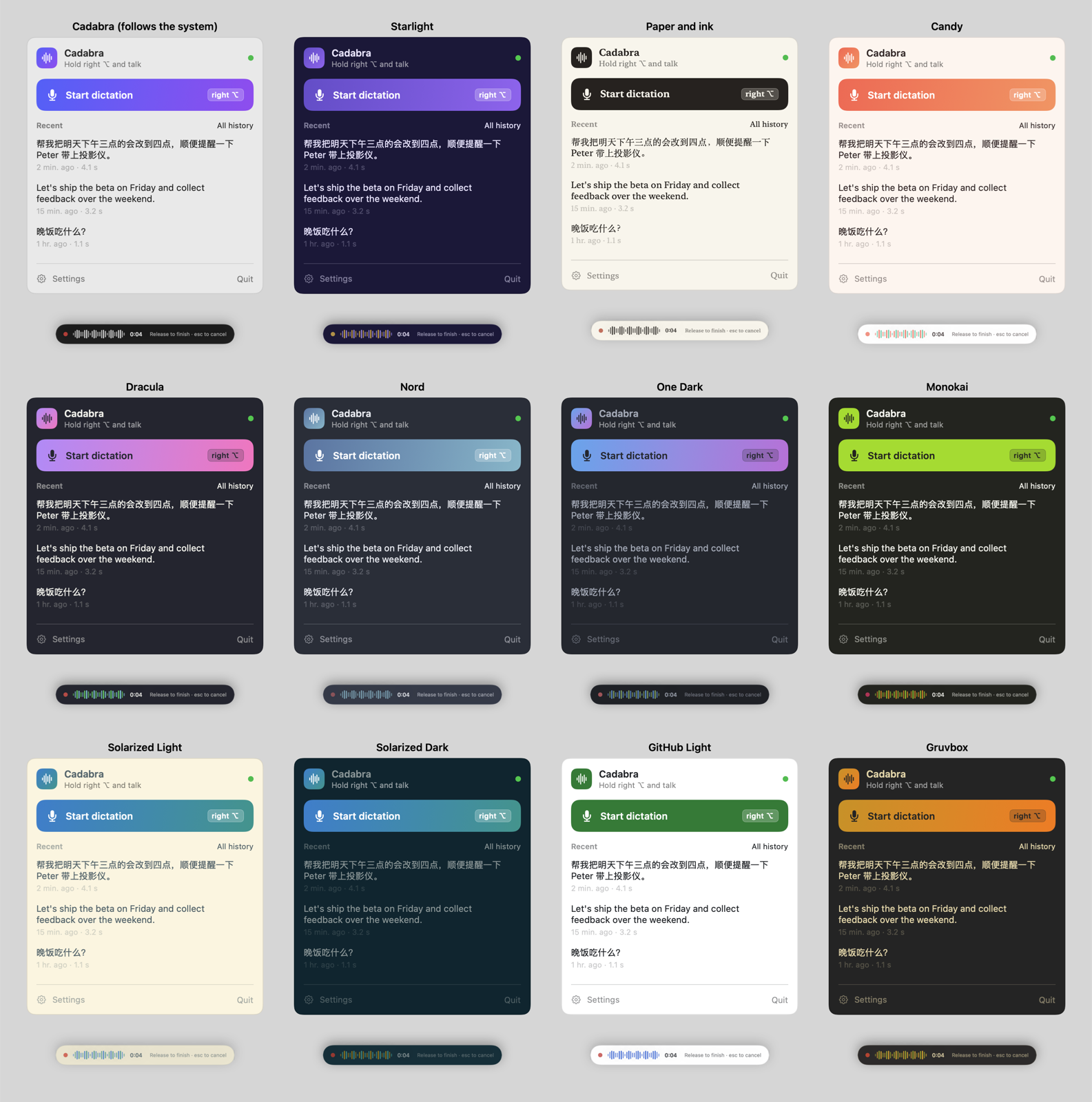
The new name came with themes, from Cadabra's own to the editor palettes I know from VS Code.
Upgrading from MyWisper moves everything over on the first start: settings, history, learned fixes and models. macOS asks for the microphone and Accessibility once more, since to macOS it's a new app.
Still nothing leaves the Mac
Cadabra still never uploads anything: no audio, no text, no learned words, no recordings, no usage data. Recognition, correction and learning all run on the Mac, and the recordings stay in a folder only my account can read.
There are now two network requests in the code, and both only bring something in. One downloads the correction model, after you click Download. The new one, Check for Updates, asks GitHub whether there's a newer release, only when you click it, or once a week if you turn that on. It's off by default and never downloads or installs anything itself.
Cadabra 1.2.0 is on GitHub, with a new home page.
The lesson from this round: learning from fixes is easy, but learning only the right ones is the real work. Half of what it first learned was me rewording, and it had no way to tell those apart.