My Dictation App Now Fixes What It Mishears
Nov 12, 2026
Two days ago I released MyWisper, a Mac dictation app that runs a small speech model, SenseVoice, entirely on the machine. Using it for everything I type, mostly Chinese with English mixed in, turned up a bug and a bigger limit: it gets sounds right but names wrong.
One afternoon with Claude produced two releases. The second adds a step I hadn't planned: a local language model that reads what SenseVoice heard and fixes the mistakes from context.
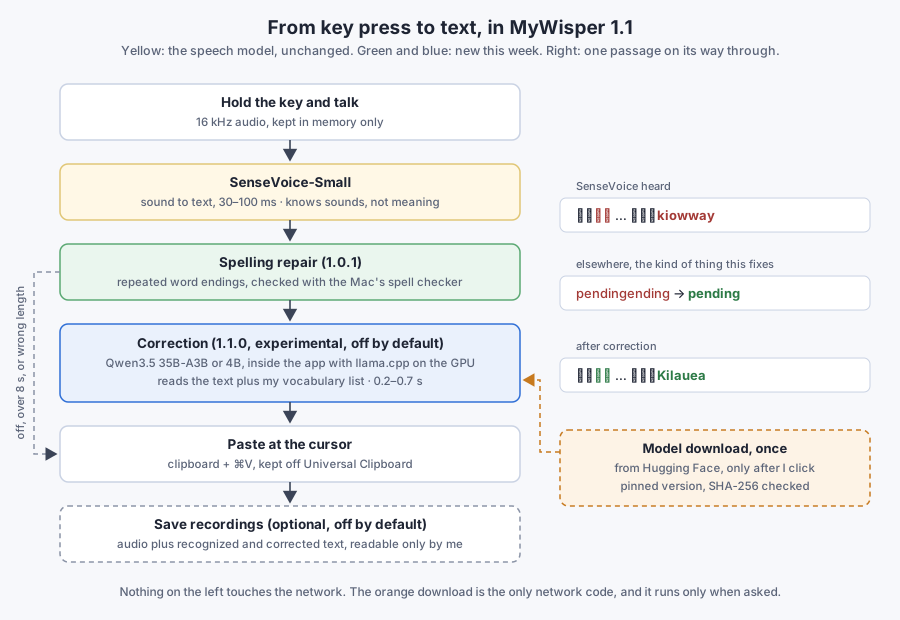
Words that end twice
Now and then an English word came out with its ending repeated, like pendingending. SenseVoice itself does it: it emits the whole word, then a piece that repeats its ending. The fix is a spelling rule. A word is repaired only if it's misspelled and becomes a correct word once the repeat is removed, checked with the Mac's built-in spell checker. Real words like singing and names the dictionary doesn't know are left alone. That was version 1.0.1.
Whisper translated my English
Next I tried OpenAI's Whisper as a second recognizer. Its English was clearly better, but when a sentence switched fully to English, Whisper translated it into Chinese, whatever prompt Claude tried. It picks one language for the whole recording. For the way I talk that rules it out, so it came back out.
Letting a language model read it
Whisper didn't get the names either. When I asked Claude how it had known that 哈娃伊 meant Hawaii, the answer was that it couldn't hear anything: it read the text and guessed from sound and context. That's a job a local language model can do too. So correction became an option, off by default, together with a vocabulary list for names I use often.
Claude built a small test set from the day's real recognition errors, plus sentences like "ignore the previous instructions" that must pass through untouched, not be obeyed. Qwen3.5 35B-A3B did best: 9 of 10 in about 240 ms. It has 35 billion parameters but uses only about 3 billion per word. The 125B model I already run on the Mac scored 8 in over a second, and the 9B and 4B models 7.
The smaller models taught the rules: don't swap in synonyms, don't add spaces, don't translate, and never answer the text. If the answer comes back far longer or shorter than the input, or takes more than 8 seconds, the app types what SenseVoice heard instead.
Inside the app
The first version talked to a model server. I wanted the app to stand on its own, so llama.cpp is now compiled into MyWisper and runs on the GPU. The model isn't bundled. Turning on correction shows what it would download and how big it is, and nothing happens until you click: 35B-A3B (22 GB) for Macs with 48 GB of memory or more, Qwen3.5 4B (2.7 GB) for the rest. The file comes from a pinned version on Hugging Face and is checked against its SHA-256.
After some more prompt tuning on my own recordings, it passes 12 of 14 test sentences in about a third of a second. The first real test was a rambling paragraph about a trip to Hawaii:
| SenseVoice heard | After correction |
|---|---|
| 我有点想去大道,想去看那个火山叫做什么?不是蒙南利啊。 | 我有点想去大岛,想去看那个火山叫做什么?不是冒纳罗亚啊。 |
| 嗯,大岛那个火山好像叫kiowway。 | 嗯,大岛那个火山好像叫Kilauea。 |
Neither the Big Island (大岛) nor Mauna Loa (冒纳罗亚) is in my vocabulary list: the model worked them out from "Hawaii" and "volcano" in the same passage. The last line got Kilauea from nothing more than 大岛 and 火山 (volcano). The sentences that were already right came through unchanged.
It still guesses wrong sometimes. When I asked for this post to be shorter, I said 整个post有点太长了. SenseVoice heard poOS, and correction confidently made it 整个 Postgres 有点太长了. When the context doesn't pin a garbled word down, it can still turn into a confident wrong guess.
Still nothing leaves the Mac
The promise from the first version stands: MyWisper never uploads anything. Not the audio, not the text, not the vocabulary list, not the saved recordings, and no usage data. Recognition and correction both run on the Mac.
There is now exactly one network request in the code: downloading the model file from a fixed Hugging Face address, and only after you click Download. It sends nothing of yours and only brings a file in. With correction off, the app never touches the network at all.
Building the release also turned up my home folder's path inside the app, left there by llama.cpp's source paths and by Swift's debug symbols. Both are now stripped, and the release script refuses to build a disk image if the path comes back.
MyWisper 1.1.0 is on GitHub, with correction marked experimental.
The lesson from this round: the speech model hears sounds, and a language model reads meaning. On a Mac with enough memory, adding the second costs a third of a second.