Dictation That Stays on My Mac
Nov 10, 2026
Dictation apps like Wispr Flow work the same way: hold a key, talk, let go, and the text lands wherever the cursor is. That's a nice way to write a long message, and I wanted it without sending my voice to anyone's server.
My first attempt was a Python app called MyWisper, which I had Gemini write. It didn't quite work. It uses SenseVoice-Small, a small open speech recognition model that handles Mandarin, English, Cantonese, Japanese and Korean. Quantized to 8 bits, it's about 230 MB and runs on the CPU through sherpa-onnx. The model was never the problem: it transcribes a sentence in 30 to 50 ms. Everything around it was.
For the second attempt I handed it to Claude, as with my other recent projects. It reviewed the Python version, rewrote it as a native app, and fixed what I ran into using it. By just after midnight, it was a public release. All in one long day.
What was wrong with the Python version
Claude's review found four real bugs:
- The menu bar icon never appeared. On startup the app cleared its "recent history" submenu before the submenu existed. That threw an error, the app caught it, and quietly fell back to running in a terminal window. Every time.
- The language menu did nothing. Picking Chinese or English saved the choice to a config file, and that was all.
- The hotkey lost track of the state. It kept its own idea of whether it was recording. Stop from the menu, and the next press of the hotkey did nothing; you had to press it twice.
- Any web page could use it. The app ran a small HTTP server on localhost with no password and a header that allows every website to read the responses. Any page I had open could fetch my last 20 dictations, or start the microphone. The transcript would then be pasted wherever my cursor was.
Each fix was small. But I'd also wanted a proper interface, so I asked for a native app instead.
The native version
It's a Swift menu bar app. The pieces:
- The model: the same SenseVoice model, called through sherpa-onnx's C library. The library files come straight from the Python package, and the model ships inside the app.
- The hotkey: a system-wide keyboard listener that watches one modifier key, by default right Option.
- The audio: the system's audio engine, converted to the 16 kHz mono the model expects. Recordings stay in memory and are dropped after transcription.
- The typing: the text goes on the clipboard, the app sends a ⌘V, and then puts back whatever was on the clipboard before.
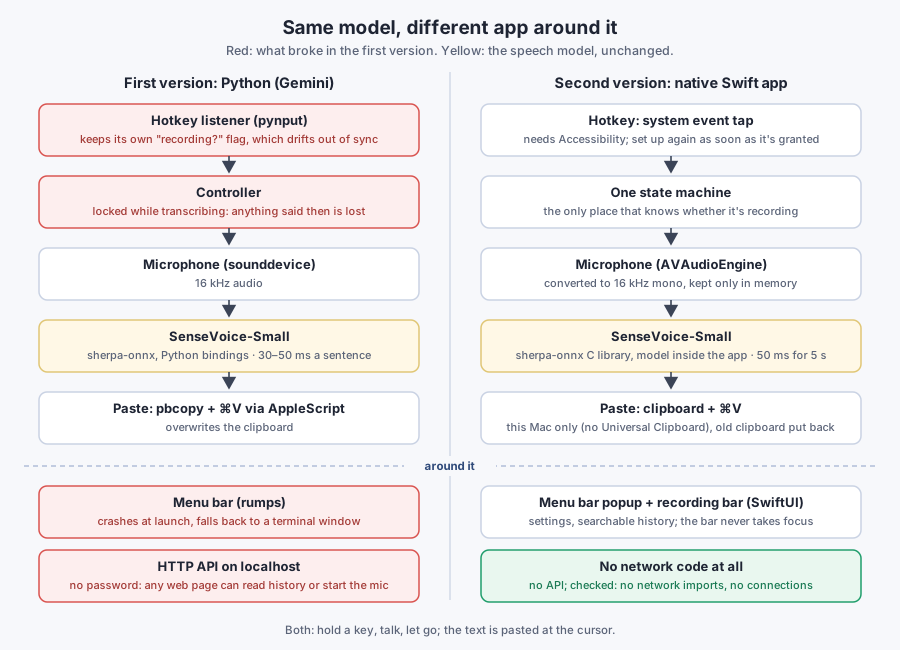
Loading the model takes 0.35 seconds at startup. After that, five seconds of speech take about 50 ms to transcribe. Letting go of the key and seeing the text feels instant.
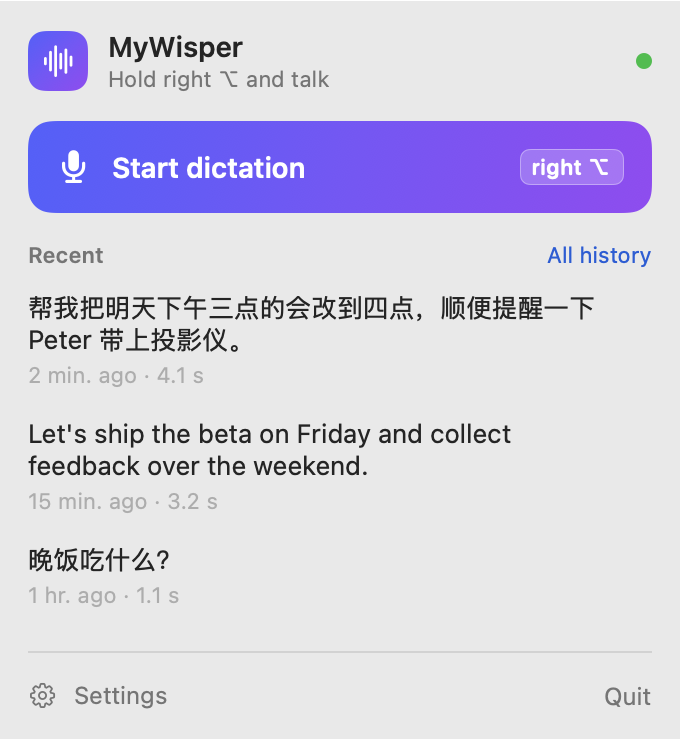
The menu bar popup, rendered by the app itself with sample text. Clicking an entry copies it.
While you talk, a small bar at the bottom of the screen shows a live waveform and the time. It never takes focus, so the text still goes into the window you were typing in.

The hotkey had to be careful, because Option and Control are also parts of normal shortcuts:
- Hold or tap. Hold the key to talk and let go to finish, or tap once to start and again to stop.
- Combinations cancel. If another key is pressed while the hotkey is held, say ⌥E or ⌃C, that was a shortcut, not dictation, so the recording is dropped silently.
- A short delay. The microphone only starts 0.12 s after the key goes down, so quick shortcuts never touch it.
- Esc cancels, and a recording that's too short or too quiet is thrown away rather than sent to the model.
One thing behaved differently from what I expected. Forcing the language barely changes the result: SenseVoice detects the language on its own, and telling it "this is English" didn't change the output for Chinese audio, in either the Python or the C interface. So the Python version's broken language menu hadn't cost me anything. In the new app it's a "language hint" in the settings.
Permissions are the hard part
Two problems came up when I actually used it, and neither was in the code that does the work.
I pressed the wrong key. I tried Control; the default was right Option, and left Control wasn't even an option. Now the settings have a "press the key you want" button, which also proves the app can see that key.
Then it only worked while the app was in front. A Mac app needs the Accessibility permission to watch the keyboard system-wide and send the ⌘V. Without it, macOS still lets the app create the keyboard listener, but only hands it the keys meant for the app itself. No error, just a hotkey that works in exactly one place.
It had no permission because of how it was signed. Without a developer certificate, the app was signed ad hoc, and macOS ties each permission to the signature. Every rebuild looked like a new program, so the permission I'd granted belonged to an older build. On top of that, the app set up its listener once at launch, so granting permission later didn't help until a restart.
The fixes: the build now signs with a self-signed certificate made once on this Mac, so rebuilds keep their permissions. And the app checks for the permission every second, setting up the listener as soon as it's granted.
Does it send anything anywhere?
The whole point was to keep my voice on my machine, so I asked Claude to prove it rather than assume it. The checks:
- The code has no network calls.
- The compiled app and its two libraries don't import any networking functions: no sockets, no DNS, no URL loading. A program that can't call them can't open a connection.
- The running app has no network connections open.
- With the network blocked for the process, transcription in all five languages gave exactly the same results.
The review found one leak I wouldn't have thought of. The app puts the text on the clipboard to paste it, and macOS's Universal Clipboard syncs the clipboard to my iPhone and other Macs. Now the app marks its clipboard writes as local to this Mac, so they don't sync.
What stays on the Mac is a history file that only my account can read, which can be turned off or cleared in the settings.
Giving it away
Late that night I put it on GitHub. It got an English interface first, and a last scan of the files and git history for anything private. I skipped Apple's $99-a-year Developer ID, so macOS blocks the first launch until you allow it once under Privacy & Security.
MyWisper is on GitHub, free under the MIT license, for Apple silicon Macs on macOS 15 or later.
The lesson I'd take: on a Mac, the model is the easy part. SenseVoice was fast and accurate from the first test. The day went into keys, permissions, signing and the clipboard: everything between my voice and the cursor.