The FPGA Finally Earns Its Keep
Nov 3, 2026
The first version of my KVM worked, but it ended on an awkward note. It ran on a PYNQ-Z2, a board with an FPGA and two 650 MHz ARM cores, and the FPGA did almost nothing. It copied each HDMI frame into memory; the CPU then spent 80 ms per 720p frame encoding JPEG, and that capped the picture at 15 frames a second. At 1080p, software managed about 5.
There was a cheaper fix: an HDMI-to-camera bridge on a Raspberry Pi, running PiKVM, would do 1080p at 30 for $20–30. But I had the FPGA right there, so I asked the obvious question: would JPEG be faster in the fabric? The estimate was "much faster, and a few days of work". It took one evening. The target was 1080p. As with the first post, Claude did most of the legwork: it wrote the encoder, ran the builds and tested it on the board. I typed the passwords.
Why the FPGA can do it
The CPU encodes one pixel after another. An FPGA can lay the whole encoder out as a pipeline, where every stage works on a different part of the image in the same clock cycle. If the slowest stage handles one sample per clock, a 1080p frame takes about 3 million cycles. At 143 MHz that is 22 ms, fast enough for 45 frames a second.
It also saves the copy. The video DMA already writes each frame into memory. The encoder can read it from there, at its physical address, and write back only the compressed result. The CPU never touches a pixel: it adds the JPEG header and sends about 40 KB per frame to the browser.
Writing a JPEG encoder in C++
The encoder is written in Vitis HLS, AMD's tool that turns C++ into hardware. It's a baseline JPEG encoder, the most common kind: color subsampled to quarter resolution (4:2:0), with the standard Huffman tables from the JPEG spec. About 500 lines, in eight stages:
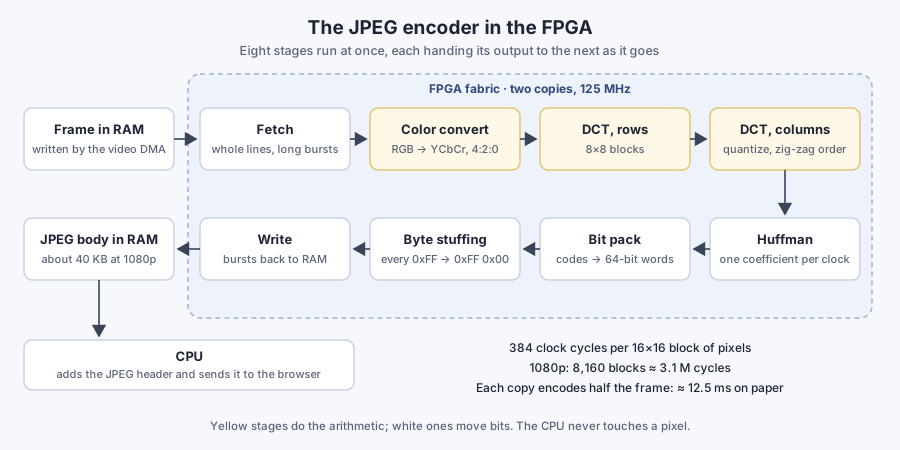
The nice part of HLS is that the C++ runs on a normal computer too, so the encoder was tested long before any hardware existed. Its output was checked two ways:
- Against libjpeg. For the same 1080p screenshot at the same quality, the files came out the same size (39.5 KB) and the same quality.
- Bit for bit against a separate reference encoder written in Python, using the same tables and quantized coefficients.
That caught one bug that wouldn't have happened on a CPU. In HLS, a 4-bit integer shifted left by 4 stays a 4-bit integer: the top bits just fall off. One Huffman table lookup built its index that way and read the wrong entry.
Making it fit the clock
Correct C++ isn't the same as fast hardware. HLS compiles every loop into a circuit, and the first synthesis said some stages couldn't keep up with a 7 ns clock: the byte-stuffing stage needed 11 ns per step. The problem is what hardware people call a loop-carried path: when the next step can't start until a long chain of logic from this step settles.
The fix in each case was to restructure, not to tweak:
- The bit packer shifted a 128-bit accumulator by a variable amount on every step. Now the shift depends only on a small running count, so the part that feeds back into the next step is just an OR.
- Byte stuffing (JPEG reserves the byte 0xFF, so every 0xFF in the data needs a 0x00 after it) was split into two simpler stages.
- The color stage first stored whole stripes of raw pixels. It now converts as pixels arrive and stores the converted samples instead. That cut on-chip memory from 158 blocks to 80, and multipliers from 129 to 51.
After each change, the C++ test had to produce exactly the same output as before.
Making it fit the chip
The encoder sits inside PYNQ's stock "base" design, the one with the HDMI input, so the HDMI driver still works. Rebuilding that design needs Vivado, AMD's FPGA tool, and exactly the 2024.1 release, the one PYNQ 3.1 was built with. Vivado doesn't run on a Mac, so it went into an Ubuntu container on an x86 Linux box at home: a 13 GB download, installed with only the one chip family.
The first build crashed. Vivado died with realloc(): invalid pointer deep inside libudev, which its license code calls to list the machine's hardware. In a container there's no hardware list to read. Mounting the host's udev data didn't help, and neither did preloading a library. What worked was a fake libudev that reports no devices at all, placed first in Vivado's library path.
The second build failed at placement: the design needed 90% of the chip's logic. The encoder itself uses only about 16% of it. The biggest chunk, more than a third, was the base design's four small MicroBlaze processors that drive the board's Arduino, Raspberry Pi and Pmod headers, and the KVM uses none of them. Removing the two biggest freed enough room.
The next build closed timing with 0.3 ns to spare, at 65% of the chip. Each build takes about 40 minutes, even after raising the parallel jobs from PYNQ's default of 4 to 16. A lot of that time is single-threaded.
On the board, the first try gave a correct picture: 1,707 frames in a 60-second test without a single error, at about 29 frames a second. That was the cap I'd set, 30. Five times faster than software, with the CPU mostly idle. I could have stopped there.
From 29 to 60
The server sends 60 frames a second, though, and the encoder was supposed to manage 45. Three changes closed the gap.
Overlap the work. The loop still did one thing at a time: wait for a frame, encode it, wait for the next. Now it starts the encoder on one frame and fetches the next while the hardware runs. That alone gave 41 fps.
Two encoders, half a frame each. JPEG already has a way to split an image: restart markers. At each one, the decoder resets its running state and starts again on a byte boundary. My encoder already did exactly that at the start and end of every image. So the second copy encodes the bottom half as if it were a separate picture. The CPU adds one field to the header and puts the two-byte marker between the halves. In simulation, the stitched image came out pixel-for-pixel identical to encoding the whole frame at once. The encoder itself didn't change at all.
Two encoders needed more room and more slack. Removing the other two MicroBlazes and some debug hardware brought the chip down to 58%. But at 143 MHz, the build missed timing by 0.4 ns. The slow path was in the memory interface HLS had generated, not in my code. The encoders now run on their own 125 MHz clock, which closes with 0.27 ns to spare. On paper each half takes 12.5 ms. Measured from the CPU, a frame takes about 15 ms from starting the encoders to having the JPEG in hand, still inside the 16.7 ms between frames. That gave 54 fps.
Remove the sleep. It should have been 60, so Claude added a timing breakdown of the loop to the status page. The CPU's own share of each frame came to about 3.3 ms; the encoders run alongside it. The rest went to a sleep. To cap the frame rate, the loop slept until 1/60 of a second after each frame arrived. Then fetching the next frame took another 1.2 ms on top. That set a ceiling of about 56, and some jitter cost the rest. At a cap of 60 there is nothing to limit: fetching a frame already waits for the next one from HDMI. With the sleep gone, it ran 1,800 frames in 30 seconds.
The result
| 1080p | Software JPEG | One FPGA encoder | Two FPGA encoders |
|---|---|---|---|
| Frame rate | about 5 fps | about 29 fps | 60 fps |
| Encoding one frame | 240 ms, plus a 45 ms copy | 23 ms, no copy | about 15 ms, both halves at once, no copy |
| What limits it | the two CPU cores | a 30 fps cap; one step at a time | the HDMI input, with the encoders close behind |
The encoders are busy for about 15 of the 16.7 ms between frames. Meanwhile the CPU has almost nothing to do: it spends about 14.5 ms of every frame waiting for the next one to arrive from HDMI, while the encoders work on the previous one. So 60 is the limit of the server's HDMI output, but the encoders aren't far behind: they have about 10% to spare. The page now feels like a screen rather than a slideshow, at the server's full resolution. If the bitstream is missing, the program falls back to software encoding on its own.
It also asks for 1080p on its own now. An HDMI sink tells the source which modes it prefers, and PYNQ's base design asks for 720p, so at first I set the server to 1080p by hand. That setting would have been lost the next time its display server restarted. The new design tells the server it prefers 1080p, and xrandr on the server now marks 1920×1080 as both preferred and current.
What's left
- Booting at the same moment. When the PYNQ boots, it loads the stock 720p design for a few dozen seconds before the KVM swaps in its own. If the server boots at the same time, it can pick 720p. Replugging the cable fixes it; loading the KVM's design first would rule it out.
- A still screen is still re-encoded 60 times a second. At about 40 KB a frame, that's around 19 Mbit/s on the home network for a login screen that isn't changing. Skipping unchanged frames would fix it.
- The browser has a say. The board streams 60; what you see also depends on the network and how fast the browser decodes.
The lesson I'd take: in HLS, the C++ is the easy part. A correct encoder came out of simulation in well under an hour. Fitting it to the clock, the chip and the toolchain took the rest of the evening, most of it waiting on 40-minute builds. And the last 10% of the frame rate wasn't in the hardware at all. It was one sleep() in Python, found only after measuring every stage of the loop.