A Local-Only Garage Door Opener for Apple Home
Oct 18, 2026
My garage door opener was the one door in the house I couldn't close from my phone without installing a vendor's app, making a vendor's account, and letting a vendor's cloud poll my opener's status every few seconds. That's a strange dependency for a device whose entire interface is two screw terminals.
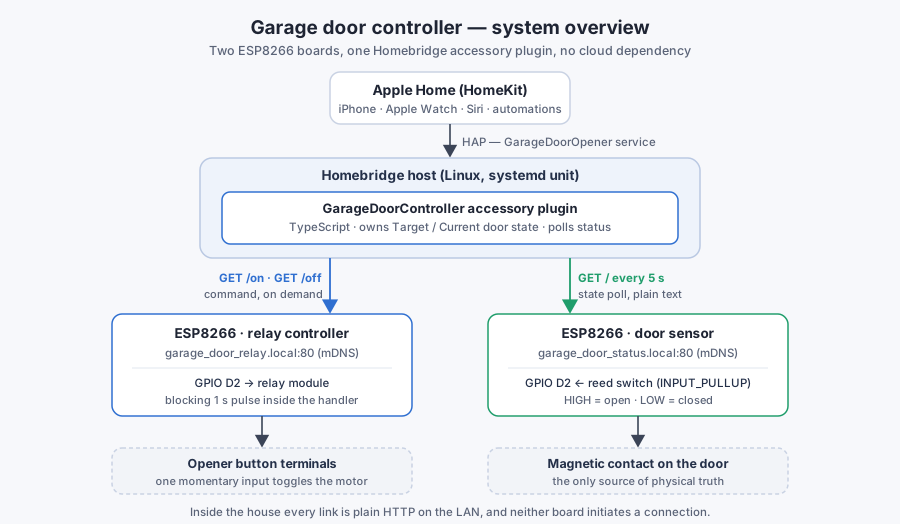
So I built the missing piece myself: two ESP8266 boards and a Homebridge accessory plugin, all of it local. Neither board ever opens a connection to anything — they join the WLAN, answer HTTP on port 80, reply to mDNS, and stop there. No vendor account, no cloud polling the opener, no broker to keep alive. Inside the house the whole path is on the LAN; the only way anything leaves it is Apple's own encrypted relay when you operate the door from outside the house. The interesting part isn't that it works — it's how few parts the honest version needs, and how much of the design is forced by an interface with exactly one input.
The constraint that shapes everything
A garage door opener head unit exposes one input: a normally-open momentary contact. Shorting it for a moment does whatever the wall button does — start a close, start an open, or stop a moving door. There is no "go to closed" command, no position feedback, no acknowledgement beyond the relay clicking.
Everything downstream is an interpretation of that one input:
- Actuation is a pulse, not a direction. "Open" and "close" are indistinguishable at the wire.
- State comes from exactly one binary sensor — a magnetic reed switch on the door edge.
- Confirmation doesn't exist. After a pulse you can only watch the sensor and hope.
That single fact drove most of the design, including the parts I got wrong.
The pieces
| Component | Hardware | Role | Interface |
|---|---|---|---|
| Door sensor | Wemos D1 Mini Lite (ESP8266) | Reads a reed switch, reports state | GET / → open / closed |
| Relay controller | Wemos D1 Mini Lite (ESP8266) | Pulses the opener's button terminals | GET /on, GET /off → 1 s pulse |
| Bridge plugin | Homebridge on a Linux host | Translates HAP to HTTP, owns door state | HomeKit GarageDoorOpener service |
Both boards are the same board, on the same PlatformIO environment (espressif8266, d1_mini_lite), and both run a nearly identical sketch: connect to WiFi, start an ESP8266WebServer on port 80, register an mDNS name, serve a handful of one-line text endpoints. The firmware files are around 120 lines each, and most of that is the ESP8266 web-server example I started from and never fully cleaned up.
The plugin is a Homebridge accessory plugin (not a platform plugin) written in TypeScript. It registers one GarageDoorOpener service, exposes TargetDoorState and CurrentDoorState, and does http.get() calls. That's the whole bridge.
{
  "accessory": "GarageDoorController",
  "name": "Garage Door",
  "open_url":   "http://garage_door_relay.local/on",
  "close_url":  "http://garage_door_relay.local/off",
  "status_url": "http://garage_door_status.local"
}
Plain HTTP everywhere, for the least ambitious reason: it was the easiest thing to stand up. The ESP8266 core ships a web server, a one-line text endpoint is the smallest interface that works, and there was nothing extra to install on either side of the wire. The one thing that choice costs me is push — nothing tells the plugin the door moved, so it has to ask.
Two boards, not one
The obvious design is one board with a reed switch on one pin and a relay on another. I used two boards instead, for two reasons that both turned out to matter.
Placement. The reed switch belongs at the door edge. The relay belongs at the opener head unit, up near the ceiling, next to the terminals it needs to short. Those are two to three metres apart with a metal door between them. One board means either a long sensor run past the moving door or a long low-voltage wire up to the header, and the failure mode of a wire chafing through on a door track is "silently reports closed forever."
Blast radius. The relay board is the only thing that can do something. It has one endpoint that pulses and no knowledge of state. The sensor board can be reflashed, rebooted, or powered off and the worst case is a stale status reading. I can iterate on the sensor firmware without a board attached to my door motor in the loop.
The cost is a second board, a second power supply, and a second IP address — cheap. If your sensor and your opener terminals are within reach of one board, one board is genuinely simpler.
mDNS instead of static IPs
Each board calls MDNS.begin() with a name and the plugin config stores URLs, not addresses:
WiFi.hostname("garage_door_status");
MDNS.begin("garage_door_status");
Nothing is pinned in a DHCP lease and nothing needs updating when I reflash a board or move it to another access point. The trade-off is that mDNS has to actually work end to end: the Homebridge host needs a working responder (avahi on Linux), and multicast doesn't cross a subnet or VLAN boundary. If I ever put these boards on an isolated IoT VLAN, this is the first thing that breaks, and the fix is an mDNS reflector rather than a trip back to static IPs.
Firmware stays stateless; the plugin owns the model
Both /on and /off do exactly the same thing:
server.on("/on", []() {
  server.send(200, "text/plain", "Opening");
  digitalWrite(relay, HIGH);
  delay(1000);
  digitalWrite(relay, LOW);
});
That's not laziness — it's a deliberate choice about where semantics live. The opener can't tell the difference between open and close, so a firmware that pretended to is lying. The firmware's honest contract is "I will pulse for one second." The plugin is the layer that decides which URL to hit, and the layer that has to reconcile the result with HomeKit's idea of a door.
Two implementation notes from that handler. The response is sent before the pulse, so the caller isn't held open for the full second. And delay(1000) blocks the whole loop(), which means for that second the board stops servicing HTTP and stops calling MDNS.update(). For a device that receives one request every few seconds, that's acceptable; it stops being acceptable the moment anything else talks to it.
The HomeKit side: two door characteristics
HomeKit models a garage door with two characteristics: TargetDoorState, what the user asked for, and CurrentDoorState, what the door is doing. The plugin maps both onto the boards with a handful of handlers:
| HomeKit | Plugin | Board |
|---|---|---|
TargetDoorState SET |
GET /on or GET /off |
relay controller |
CurrentDoorState GET |
GET /, on demand |
door sensor |
CurrentDoorState push |
GET /, every 5 s |
door sensor |
Because the opener has a single input, the two command URLs are the same pulse. TargetDoorState = OPEN means pulse and TargetDoorState = CLOSED also means pulse; the distinction exists only in the plugin and nowhere on the wire. HomeKit also defines OPENING and CLOSING as current-state values, which is the honest vocabulary for a door that spends eight to twelve seconds in neither of the states the reed switch can see.
Polling, because nothing pushes
The plugin polls the sensor every five seconds and also fetches on a HomeKit-initiated GET. Five seconds came from arithmetic: one request every second is ~86,400 requests a day against an 80 MHz microcontroller that also blocks for a second when asked to move the door. Five seconds is still comfortably shorter than the door's travel time, so nobody in the house has an opinion about it.
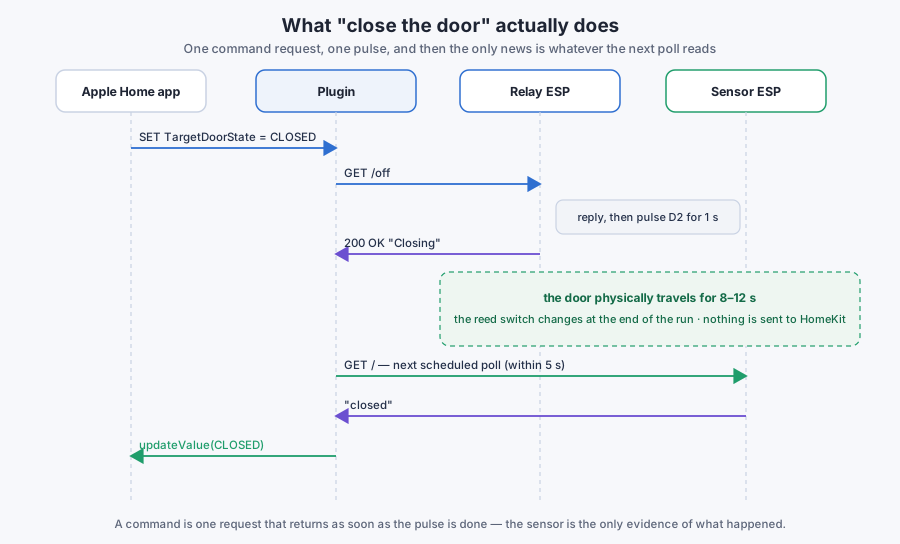
The loop is deliberately open. A command is one request that returns as soon as the pulse is finished, and the only evidence that the door moved is a reed switch changing state somewhere out in the garage. Nothing interrupts that quiet — the plugin finds out on the next poll, and HomeKit finds out a few milliseconds after that.
That is also what makes the system easy to reason about. There is exactly one path by which the app learns anything about the door, and it is a request I can make myself with curl. Every state Home shows traces back to a line of text the sensor board returned.
Testing a plugin whose only test environment is a house
Flashing a board and walking to the garage is a slow loop, and almost all of the logic lives in the plugin rather than the firmware, so the plugin has Jest tests that mock http and hand-build the slice of the Homebridge API it uses:
const mockHapCharacteristic = {
  CurrentDoorState: { OPEN: 0, CLOSED: 1 },
  TargetDoorState:  { OPEN: 0, CLOSED: 1 }
};
The mock has to encode HomeKit's numeric contract by hand — OPEN is 0 and CLOSED is 1 in both enums — so the tests exercise what HAP actually receives rather than what TypeScript believes. They cover the cases that used to need a walk to the garage: sensor returns open/closed, HTTP errors, non-200 responses, the callback contract for both directions, and that polling actually fires on the interval (with fake timers).
One TypeScript detail worth keeping in mind for any Homebridge plugin: import only types from the homebridge module and take HAP from the api.hap object at runtime. A value import compiles to a require("homebridge"), which loads a second copy of HAP-NodeJS and produces collisions that look nothing like an import problem.
The deploy loop is still manual, and it's the part I'd automate next:
npm run build && sudo npm install -g . && sudo systemctl restart homebridge
sudo journalctl -u homebridge -n 50 --no-pager
Should you build this
If you want a garage door in Apple Home this weekend, use a supported bridge or an ESPHome build with native HomeKit support — that path is shorter, and its HomeKit implementation has had more eyes on it than mine.
I built this one because the interesting part wasn't getting the door into the Home app. It was how little the finished thing is: two boards running about a hundred and twenty lines each, a plugin that makes four kinds of HTTP request, and roughly two hundred lines of glue between a tile on my phone and a piece of sheet metal on a spring. Almost nothing in it was a free choice. One momentary input, one binary sensor, two mounting points three metres apart, and a door that takes ten seconds to arrive decided most of the architecture for me — and what fell out is smaller and more legible than anything I would have drawn on a whiteboard first.