A KVM From the Spare-Board Drawer
Nov 2, 2026
My home server lives under a desk with no monitor and no keyboard. That's fine until it won't boot. The night before this project, its system disk died. Fixing it meant dragging over a monitor and a keyboard and booting it from a USB stick, on the floor.
A KVM fixes that: it captures the screen and fakes a keyboard and mouse, so you can work the console from another computer, BIOS included. You can buy one, or build a PiKVM. But I already had the parts in a drawer: a PYNQ-Z2, an FPGA board with an HDMI input, and a Pi Zero 2 W. The same day I'd 3D-printed cases for both, so they needed a job.
Seeing the screen
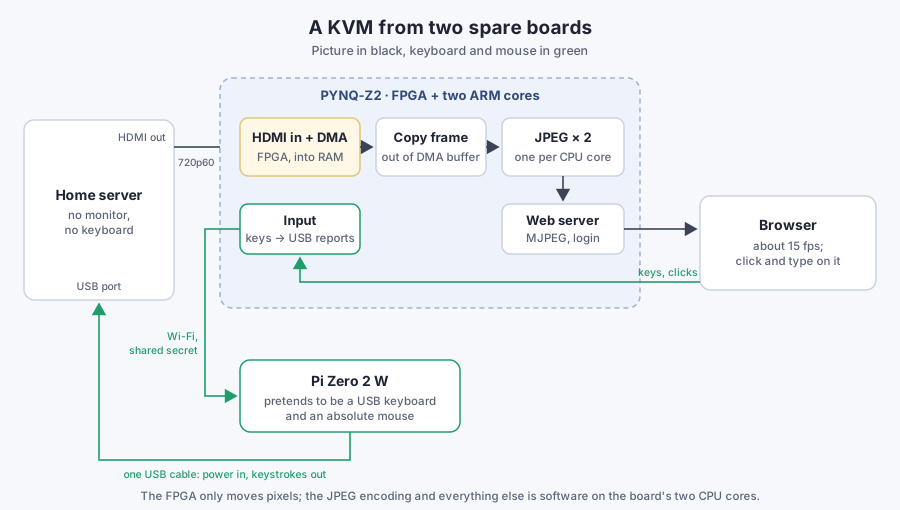
The PYNQ-Z2 pairs a Xilinx Zynq FPGA with two 650 MHz ARM cores running Linux and Python. Its stock "base" design already includes an HDMI receiver and a video DMA engine that writes every incoming frame into RAM. So the video side needed no FPGA work at all. One Python program, about 500 lines, does the rest:
- Load the base design, start HDMI capture (the board asks for 1280×720, so that's what the server sends).
- Copy each frame out of the DMA buffer and encode it as JPEG with OpenCV.
- Serve the JPEGs as an MJPEG stream behind a password, plus a snapshot and a status endpoint.
The first version ran at about 10 frames a second and worked, for a minute or two. Then things started crashing: the KVM itself, random other programs, and once even my SSH session to the board.
The DMA that outlived its program
The cause was the video DMA. Once started, it writes a 2.7 MB frame 60 times a second into the buffers it was given, and nothing stops it but a register write. When the program crashed, or I restarted it, that write never happened. The DMA kept writing into memory that Linux had already freed and handed to other processes. Every crash corrupted something else, which caused the next crash.
A second bug kept starting the chain. Calling the library's freebuffer() on a frame, as I had, returned that buffer twice: once by hand and once when Python cleaned up the frame object. The DMA and the program then shared one buffer. The library's own example notebook has that line commented out.
The fixes:
- Copy each frame into the program's own array and drop the library's frame at once, with no manual free.
- Halt the DMA in three places: first thing at startup, on normal exit, and from systemd after any exit, crashes included. A 60-line script writes the halt bit straight through
/dev/mem, but only if the base design is loaded; on any other design that address can hang the bus. - Do all the FPGA setup in the main thread, before the web server's threads start. Doing it elsewhere crashed too.
After a reboot to clear whatever had already been corrupted, it ran without a single crash.
The picture was black, though: the pixels maxed out at 9. The server's login screen had blanked itself after a few idle minutes, the way it would on a real monitor. A few settings on the server turned that off and woke its HDMI output.
Faster, but not much faster
10 fps feels sluggish, and 1024×768 wouldn't help much: it's only 15% fewer pixels than 720p. Where the time went:
- Reading the frame. DMA buffers are uncached by default, and copying 2.7 MB from uncached memory on these cores is slow. Marking the frame buffers cacheable fixed that.
- JPEG encoding. About 80 ms per frame on one core. OpenCV releases Python's global lock while it encodes, so two encoder threads keep both cores busy.
That brought it to about 15 fps, and that's where it stays: the two CPU cores are the limit. Why not real video, then? The browser's <video> needs H.264 or similar, and this chip has no hardware video encoder. Software H.264 on these cores would be slower than JPEG. An encoder in the FPGA itself would be a project of its own. MJPEG also suits a KVM: every frame stands alone, so a dropped frame is just skipped. When nobody's watching, it encodes nothing.
Typing
The PYNQ's USB port can't act as a keyboard: it's a host port that supplies 5 V, and the board's Linux lacks the USB gadget keyboard driver. That's what the Pi Zero is for. Its USB controller can act as a USB device, so with a few lines of Linux configuration it becomes two:
- A boot-protocol keyboard. That's the simple kind a BIOS understands, so it should work before any OS loads.
- An absolute mouse. It reports positions, not movements, so a click on the picture in my browser lands on exactly the same pixel on the server. In testing, asking for a quarter of the way across and down put the pointer at (320, 180) on the 1280×720 screen.
The browser sends keys and clicks to the PYNQ under the same login as the video. The PYNQ turns them into USB reports and forwards them over Wi-Fi to a small relay on the Pi. The relay accepts one address and a shared secret, and writes the reports to the USB gadget. One USB cable from the server to the Pi carries both the Pi's power and the keystrokes. The server sees a keyboard and mouse it has never met and just uses them.
Setting up the Pi had its own snag. I wrote its first-boot configuration by hand instead of using the Raspberry Pi Imager, and Imager is what turns SSH on. The Pi came up on Wi-Fi with SSH refusing connections. An empty file named ssh on the boot partition fixed it.
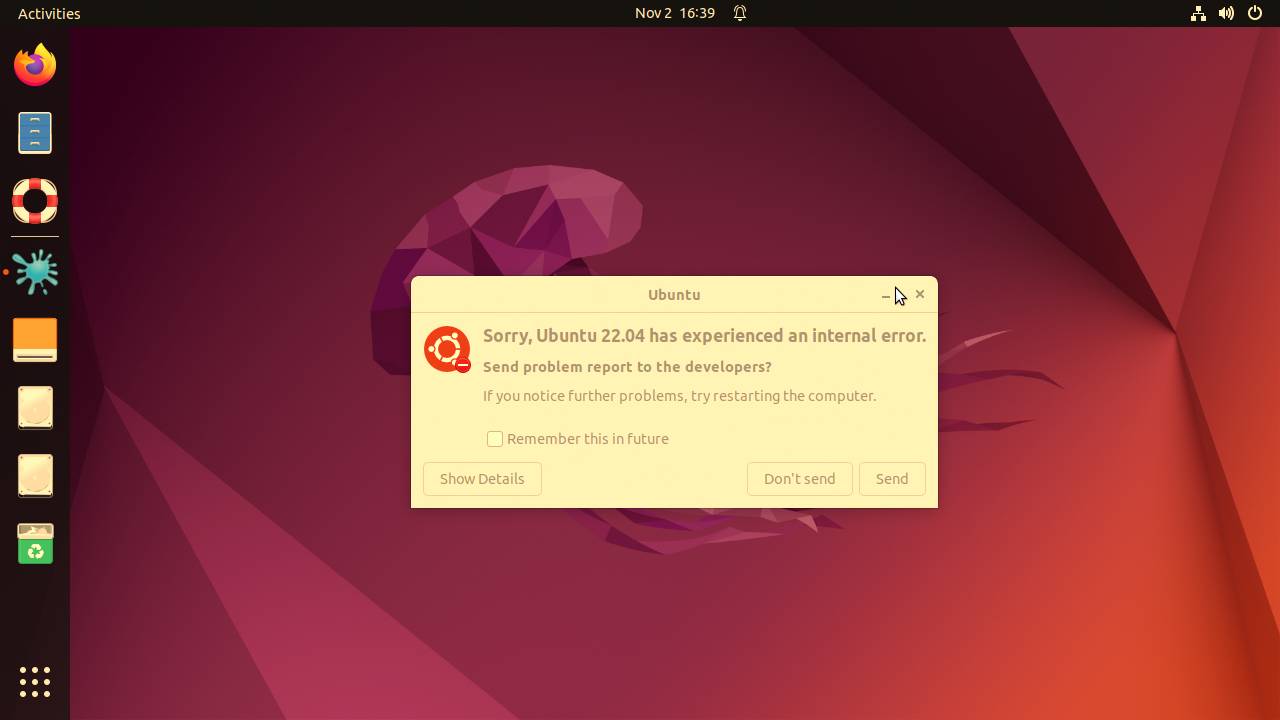
The first login typed through the KVM. The server greeted it with a crash report.
The first login also taught me what this thing is. Claude, the coding agent doing most of the legwork, was testing the keyboard at the same moment I was logging in from my browser, and some of its test keystrokes probably landed in my session. Nothing broke. But anything that can type into the server's console is the server's console, so the KVM sits behind a login, and the relay takes input from nowhere but the PYNQ.
Was it worth it?
It cost nothing but an evening. Two idle boards became a KVM, and I can now see and type into the server from any browser in the house. It's not fast: 720p at 15 frames a second is fine for a login screen and a terminal, not for anything that moves. A few things remain:
- The BIOS is still untested. The Pi takes its power from the server's USB port, so if the server cuts USB power during a reboot, the Pi reboots too, about 30 seconds behind. That could miss the moment to press Del. The fix would be separate power for the Pi.
- The server can still turn off its HDMI output when its display server restarts. Then the picture freezes on the last frame until something wakes it.
- The FPGA does almost nothing. It moves pixels into memory, which the stock design already did. Encoding JPEG in the fabric would be the obvious next step, and the most fun one.
The lesson I'd take: a DMA engine doesn't know your program died. Anything that starts one has to stop it at startup, at exit and after a crash.