I Got Tired of Checking My Token Quota, So I Made It Impossible Not to See
Oct 27, 2026
I code with two agents open: Codex on a ChatGPT plan and Claude Code on a Claude plan. Each has a 5-hour window, a weekly window and, on the Claude side, per-model weekly limits, all resetting on their own schedules.
So I kept checking. /usage in Claude Code, the status screen in Codex, back to work, check again a bit later. Each check is trivial; together they're a constant small interruption. Eventually it was annoying enough that I stopped trying to check faster and made the numbers always visible instead, like the battery percentage.
That's Quota Float.
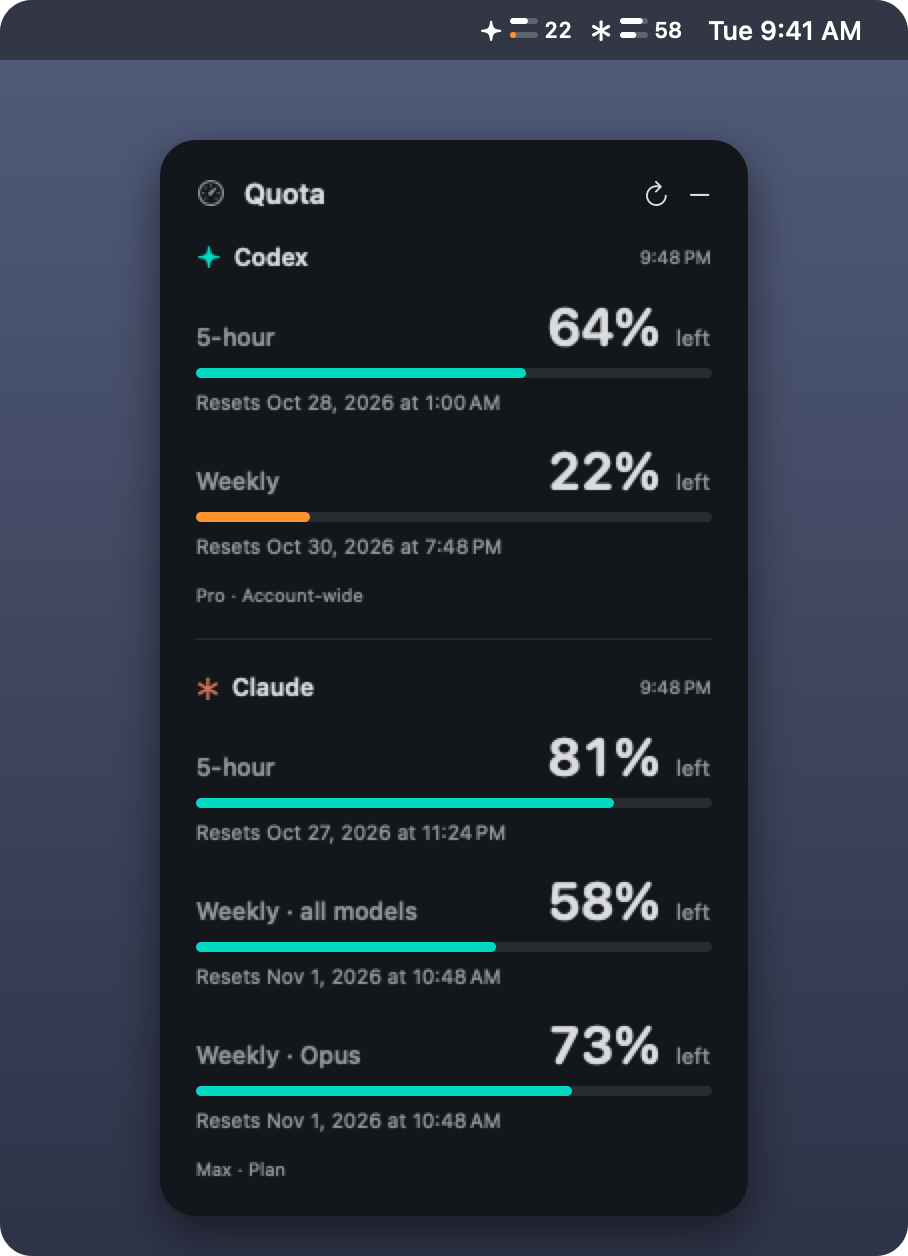
What it shows
- A floating panel with every window for both services as a percentage remaining, plus its reset time. It stays above other windows on every Space; drag it anywhere, or hide it.
- A menu-bar gauge: for Codex (✦) and Claude (✱), two tiny bars (5-hour and weekly) and the lower of the two percentages. Orange at 25%, red at 10%.
Codex refreshes every minute, Claude every five. If a refresh fails, the last numbers stay up, marked stale. Nothing is ever guessed.
No keys, no quota spent
Quota Float never stores credentials or calls a model. It asks the CLIs, which handle their own sign-in:
- Codex:
codex app-server, calling the documentedaccount/rateLimits/read. - Claude:
claude -pin stream-JSON mode with a singleget_usagerequest, the data behind/usage. No prompt is sent, so checking the quota doesn't use any.
One gotcha worth knowing: plan limits only exist for plan sign-ins, and a shell opened inside Claude Code carries environment variables that make the CLI report them as unavailable. The app strips those from the Claude process. It also puts a hard 25-second deadline on every CLI call, so a stuck process can't pile up behind a menu-bar app.
Try it
It needs macOS 13+ and either CLI signed in with your plan (codex login, claude auth login). Download the zip from the latest release and move the app to Applications. The build isn't notarized, so right-click → Open the first time, or run:
xattr -dr com.apple.quarantine "/Applications/Quota Float.app"Caveats: Claude Code marks get_usage as experimental, so a future CLI could change it. The numbers belong to whichever account each CLI is signed in to. Quota Float isn't affiliated with OpenAI or Anthropic. It's MIT-licensed on GitHub.
Now the answer is just in the corner of my eye, and I don't have to go looking for it.